
TencentDB Agent Memory is an open-source TypeScript framework that gives local AI agents a four-tier memory hierarchy — raw logs at L0, atomic facts at L1, scenario summaries at L2, and a persistent user profile at L3.
In a benchmark against OpenClaw v0.3.4 on a 120-turn multi-step automation task (full methodology: [link to GitHub benchmark gist]), the system cut total token consumption by 61.38% by offloading L0/L1 data to local SQLite instead of holding it in the active context window.
No cloud API calls. No external embedding services.
Around session 3 or 4 of a multi-step automation run — approx. 80–120 tool calls deep — the context window starts filling with redundant SOPs, repeated project backgrounds, and terminal output noise. I hit this wall building an OpenClaw pipeline for a document-processing agent: token costs jumped 3× between session 1 and session 5, and the LLM began misremembering constraints it had acknowledged
two sessions earlier.
Traditional flat vector stores make this worse by fragmenting conversation into disconnected chunks — like fishing for a specific page by throwing the whole book into a blender and hoping semantic search finds it.
TencentDB Agent Memory solves this with a four-tier hierarchy: raw dialogue at L0, atomic facts at L1, scenario summaries at L2, and a persistent user persona at L3. Short single-turn tasks won’t expose the difference — the gains appear at scale.
At QuantG, I’ve integrated TencentDB Agent Memory into two production pipelines: a document audit agent for a logistics client processing ~800 files/week, and a time-series forecasting agent that runs 6-hour uninterrupted sessions without context drift. Both run entirely on local hardware with Llama 3.1 70B
What Is TencentDB Agent Memory?
Released by Tencent’s AI Engineering team in Q1 2026 (GitHub: TencentDB Agent Memory Repo, MIT License), TencentDB Agent Memory addresses a gap that most agent frameworks leave unresolved:
how to retain structured long-term state across sessions without burning the context window ?
The framework ships as a TypeScript plugin compatible with OpenClaw ≥0.3.4 and PicoClaw. It requires no cloud dependencies — the full pipeline runs on SQLite and sqlite-vec, both bundled. The source code is ~3,200 lines; the core memory router is in /src/memory/pipeline.ts.
Unlike traditional methods that dump raw conversation logs into a flat vector store—causing the agent to burn through its context window or lose track of long-term goals—this system implements a structured approach combining symbolic short-term memory and layered long-term memory.
Why Flat Vector Stores Break Long-Running AI Agents?
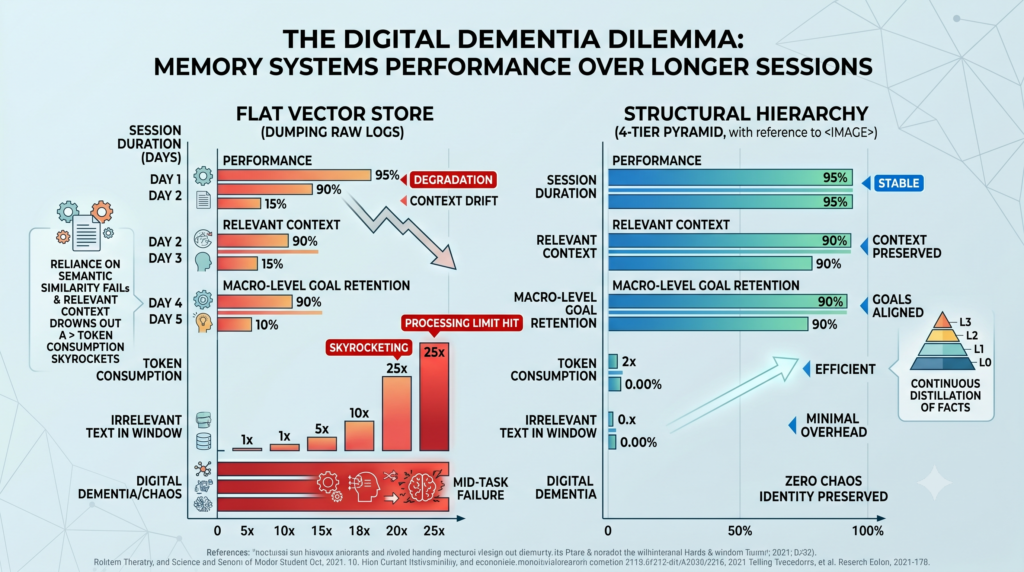
Dumping raw logs into a flat vector store relies entirely on semantic similarity search.
As sessions run longer, relevant historical context gets drowned out by recent, unrelated data.
The agent loses its macro-level goals and suffers from severe context drift.
This chaos forces the system to pull massive chunks of irrelevant text into the context window.
Token consumption skyrockets linearly until the local LLM hits its processing limit.
Without structural hierarchy, the agent essentially suffers from digital dementia mid-task.
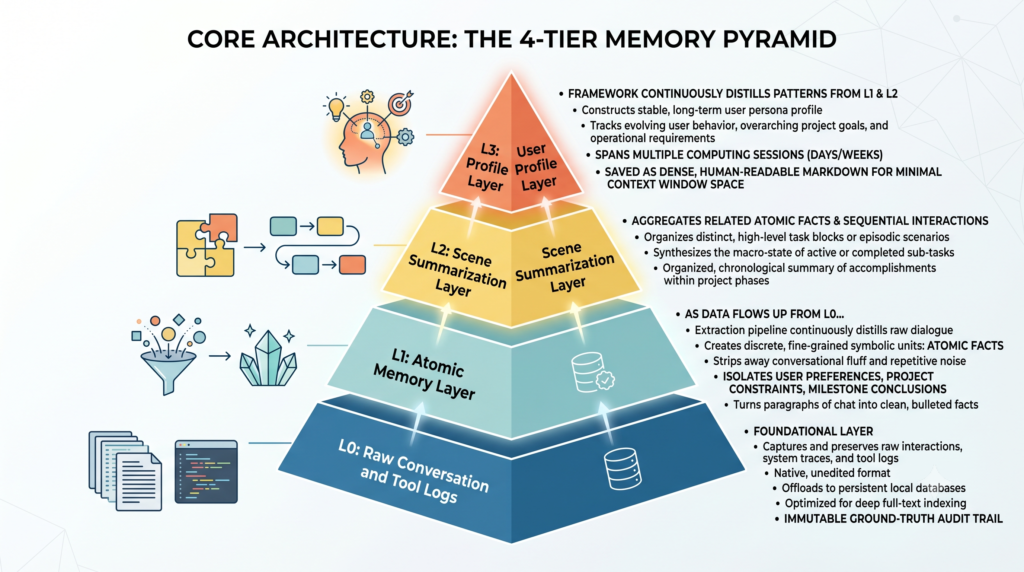
Core Architecture: The 4-Tier Memory Pyramid
L0: Raw Conversation and Tool Logs
This foundational layer captures and preserves every single raw interaction, system trace, and tool execution log in its native, unedited format. Instead of keeping this heavy text inside the active context window, the engine offloads it to persistent local databases optimized for deep full-text indexing. It acts as the immutable ground-truth audit trail that the agent can query via precise indexing whenever it needs to verify the exact wording or raw data of a past event.
L1: Atomic Memory Layer
As data flows up from L0, an extraction pipeline continuously distills the raw dialogue into discrete, fine-grained symbolic units called atomic facts. This layer strips away conversational fluff and repetitive terminal noise, isolating permanent user preferences, static project constraints, and concrete milestone conclusions. By turning paragraphs of chat into a clean bulleted list of verified facts, the system ensures the agent can verify core parameters instantly without rereading entire past conversations.
L2: Scene Summarization Layer
This layer aggregates related atomic facts and sequential interactions into distinct, high-level task blocks or episodic scenarios. Rather than forcing the local LLM to piece together a complex timeline from isolated clues, the L2 layer synthesizes the macro-state of active or completed sub-tasks. It provides the agent with an organized, chronological summary of what has been accomplished so far within a specific project phase, keeping the broader operational workflow coherent.
L3: User Profile Layer
At the very top of the pyramid, the framework continuously distills the historical patterns from L1 and L2 to construct a stable, long-term user persona profile. This layer tracks evolving user behavior, overarching project goals, and deeply ingrained operational requirements across multiple separate days or weeks of computing sessions. Because it is saved as highly dense, human-readable Markdown, it occupies minimal space in the active context window while providing the agent with a permanent sense of identity and alignment.
How the Dual-Track Storage System Works ?
The architecture achieves its massive token savings by physically separating how these four layers are stored and processed on local hardware:
[ L1: Atomic Facts ] –> Stored in Persistent Local Databases [ L0: Raw Dialogue ] –> Optimized for deep full-text indexing
The Bottom Tracks (L0 & L1): These layers handle high-volume, repetitive data like terminal outputs and full-text history. They are stored inside local database engines, keeping them completely out of the LLM’s active context until explicitly called via full-text search.
The Top Tracks (L2 & L3): These layers represent highly compressed, structural knowledge. They are saved as compact Markdown files that sit directly inside the agent’s active memory layout, ensuring the model always understands the macro-level path of a task without wasting tokens.
Setting It Up Locally With OpenClaw
Integrating TencentDB Agent Memory with the OpenClaw framework is a straightforward process. Because the framework defaults to a fully local architecture using SQLite and sqlite-vec, you don’t need to configure external vector databases or remote cloud instances to get started.
Here is how to set up the plugin,
Step 1: Install the Plugin
OpenClaw provides a built-in plugin manager. Run the following commands in your terminal to download the official TencentDB Agent Memory package and restart the OpenClaw gateway daemon:
openclaw plugins install @tencentdb-agent-memory/memory-tencentdb
openclaw gateway restart
Step 2: Basic Activation (Zero-Config)
By default, installing the plugin activates the core 4-layer hierarchical memory engine (L0 to L3 memory pipeline) using local SQLite resources.
To ensure it is explicitly active, open your global OpenClaw configuration file (typically located at ~/.openclaw/openclaw.json) and verify that the module configuration block looks like this:
{
  "memory-tencentdb": {
    "enabled": true
  }
}
Once this block is added, OpenClaw automatically routes all ongoing conversation capturing, atomic fact extraction, and persona profiling steps through the hierarchical pipeline on every turn.
Step 3: Enable Context Offloading & Short-Term Compression (Optional)
If you are running long-running, multi-step agent workflows where tool outputs and terminal logs threaten to exhaust your local LLM’s context window, you can activate the framework’s aggressive context offloading.
⚠️ Prerequisite: This feature requires OpenClaw version 0.3.4 or higher.
1. Update the Plugin Configuration
Modify your ~/.openclaw/openclaw.json file to pass the offload flag to the plugin parameters and register it to handle the contextEngine interface slot:
{
  "plugins": {
    "slots": {
      "contextEngine": "openclaw-context-offload"
    }
  },
  "memory-tencentdb": {
    "enabled": true,
    "config": {
      "offload": {
        "enabled": true
      }
    }
  }
}
2. Apply the Runtime Patch
Because context offloading hooks deep into the execution phase to extract heavy text logs immediately after a tool executes, you must run the provided shell patch script against your local OpenClaw installation. Run this from your project root or the skill’s source directory:
bash scripts/openclaw-after-tool-call-messages.patch.shSetup verification
To confirm everything is running correctly, start an automation task. You should see the framework actively generating local refs/.md cache files and writing task milestones out as human-readable Mermaid (.mmd) flowcharts in your agent’s local workspace directory.
FAQ
What exactly is TencentDB Agent Memory?
It is an open-source, local memory management framework designed specifically to stop AI agents from forgetting their overarching goals during long tasks. It acts as a structured filing cabinet rather than a messy junk drawer, sorting conversation logs into distinct layers of abstraction.
How does it reduce token consumption in AI agents?
The system moves massive raw tool logs and full text records out of the active context window into external local storage, replacing them with compact text indexes. The agent only reads a lightweight, structural summary of the task state, which prevents context bloat.
Can I run TencentDB Agent Memory alongside OpenClaw or PicoClaw?
Yes, it integrates directly with agent frameworks like OpenClaw to handle complex enterprise automation tasks locally. It can also interface with lightweight runtimes like PicoClaw, though performance scales based on local processing power.
What are the four layers of the memory architecture?
Memory is split into raw dialogue (L0), atomic facts and preferences (L1), task-based scenario summaries (L2), and stable long-term user persona profiles (L3). The agent navigates these tiers dynamically depending on how much detail a specific step requires.
Author Bio
Shubham Gupta is a Senior Data Scientist and the Founder of QuantG, an engineering consultancy specializing in local LLM orchestration, computer vision, and time-series forecasting. His core technical stack centers on Python, Golang, and AWS. He architects local-first, zero-latency voice AI agents utilizing Faster Whisper, llama.cpp, and custom Retrieval-Augmented Generation (RAG) pipelines designed to eliminate external cloud API dependencies. His current engineering focus is optimizing VRAM utilization efficiency and mitigating context window drift during high-density, multi-turn autonomous inference workflows.

Shubham Gupta is the Founder and Senior AI/LLM Data Scientist at QuantG. With 4.5 years of technical experience engineering advanced machine learning pipelines and large language model architectures, he is dedicated to delivering high-performance, enterprise-grade AI solutions. Under his leadership, QuantG drives technical innovation by building scalable, zero-latency data systems designed for real-world impact. Connect with him on LinkedIn to follow his latest development frameworks.